❰ วีซ่าไทย (Thai Visa) ❰ วีซ่าคู่สมรส-วีซ่าเกษียณ (Family-Retirement Visa)
วิธีขอวีซ่าไทยออนไลน์ ก่อนเข้าไทย
การขอวีซ่าไทย คือการขอก่อนที่จะเข้าไทย โดยขอทางออไลน์ เมื่อเข้าไทยแล้วจะไม่มีระบบขอออนไลน์ แต่มีเฉพาะการขอเปลี่ยนวีซ่า และการขออยู่ต่อ ดูรายละเอียดตามหัวข้อด้านล่างนี้
สิ่งที่ควรรู้ก่อนขอวีซ่าไทย
⬩➤ 1. เข้าไทยแบบฟรีวีซ่าได้ ไม่ต้องขอวีซ่า ▼
- เข้าไทยแบบฟรีวีซ่าได้อยู่แล้ว 60 วัน และขออยู่ต่อได้อีก 30 วัน
- ทำไมควรขอวีซ่าท่องเที่ยว แม้ฟรีวีซ่า?
- เพราะมีข้อจำกัดเรื่องจำนวนวันหากต้องการอยู่ไทยนานกว่า 90 วัน
⬩➤ 2. ขอวีซ่าก่อนเข้าไทย ต้องขอทางออนไลน์ ▼
- ต้องขอก่อนเข้าไทยเท่านั้น ถ้าเข้าไทยมาแล้ว ขอออนไลน์ไม่ได้
- กรอกใบสมัคร อัพโหลดเอกสารทางออนไลน์ www.thaievisa.go.th
- ส่วนการชำระเงิน
- ประเทศส่วนใหญ่จ่ายออนไลน์ได้เลย
- แต่บางประเทศจะมีข้อจำกัดบางอย่าง อาจต้องเดินทางไปสถานทูตเพื่อชำระเงิน ต้องดูเป็นรายประเทศ
- เมื่อวีซ่าผ่านแล้ว จะได้รับเป็นไฟล์ pdf มาที่อีเมล นำไปโชว์ตอนผ่านตม.ได้เลย (ไม่ต้องปริ้นท์)
⬩➤ 3. ทำในไทย จะไม่ใช่การขอวีซ่า แต่เป็นการ “ขออยู่ต่อ” ▼
กรณีเข้าไทยมาแบบฟรีวีซ่าหรือวีซ่าท่องเที่ยว แล้วต้องการอยู่นานขึ้น จะเรียกว่าเป็นการ “ขออยู่ต่อ” และ “เปลี่ยนชนิดวีซ่า” ไม่ใช่ “การขอวีซ่า”
- การขออยู่ต่อ คือการ ขยายระยะเวลาการพำนักในไทยให้ยาวขึ้น ตามประเภทวีซ่าที่ถืออยู่เดิม
- การเปลี่ยนประเภทวีซ่า คือ การเปลี่ยนประเภทวีซ่า จากฟรีวีซ่า/วีซ่าท่องเที่ยว ไปเป็นวีซ่า Non-O คู่สมรส / ครอบครัว / เกษียณ (❗ปัจจุบันหลังจาก พ.ย.2568 มีการเปลี่ยนแปลงแบบไม่ได้ออกเป็นกฎ แต่ในทางปฏิบัติส่วนใหญ่ไม่สามารถเปลี่ยนชนิดวีซ่าในไทยได้แล้ว)
- การขออยู่ต่อ และการเปลี่ยนวีซ่า ต้องติดต่อสำนักงานตรวจคนเข้าเมืองประจำจังหวัดเท่านั้น ไม่สามารถทำทางออนไลน์ได้
⬩➤ 4. อยู่ได้กี่วัน อยู่ต่อได้กี่วัน ทำที่ไหน ใช้เอกสารอะไร ▼
วีซ่าท่องเที่ยว TR visa
- อยู่ไทยได้เบื้องต้น 60 วัน
- การขออยู่ต่อ
- ขออยู่ต่อได้อีก 30 วัน
- ติดต่อสำนักงานตรวจคนเข้าเมืองประจำจังหวัด ไม่สามารถขอทางออนไลน์ได้
- เอกสาร: ตม.6 (TDAC) , ตม.30 , รูปถ่าย , ค่าธรรมเนียม 1,900 บาท
วีซ่า Non-O คู่สมรส / เกษียณ
- อยู่ไทยได้เบื้องต้น 90 วัน
- การขออยู่ต่อ
- ขออยู่ต่อได้ 1 ปี (ต่อ1ปีได้เรื่อยๆโดยไม่ต้องออกจากไทย)
- ติดต่อสำนักงานตรวจคนเข้าเมืองประจำจังหวัด ไม่สามารถขอทางออนไลน์ได้
- เอกสาร: ขึ้นกับชนิดวีซ่า เช่น วีซ่าคู่สมรส , วีซ่าเกษียณ , ตม.6 (TDAC) , ตม.30 , รูปถ่าย , ค่าธรรมเนียม 1,900 บาท
ขั้นตอนและเอกสาร
⬩➤ 1. ตรวจสอบเบื้องต้น ▼
เข้าเว็บทางการขอวีซ่าไทย
- www.thaievisa.go.th เป็นเว็บส่วนกลางใช้ได้กับทุกประเทศ
ตรวจสอบก่อนว่าเราต้องขอวีซ่ามั้ย ถือพาสปอร์ตประเทศอะไร จะอยู่ไทยกี่วัน
- ไปที่ Frequently Asked Questions
- เลือกประเทศของพาสปอร์ต
- เลือกจำนวนวันที่จะอยู่ไทย
- กด Check แล้วจะมีคำอธิบายขึ้นมาข้างล่าง ว่าพาสปอร์ตที่ถือต้องขอวีซ่ามั้ย
⬩➤ 2. รายการเอกสารพื้นฐาน ▼
Photograph taken within the last six months
- รูปถ่ายติดวีซ่า ถ่ายเองได้ แต่ต้องแสงเข้าทั้งหน้าไม่มีเงา
- ถ้าอัพโหลดผ่านก็ถือว่าใช้ได้
- ถ้าอัพโหลดไม่ผ่านก็ต้องถ่ายใหม่ หรือตัดกรอบให้พอดี
Document indicating current location
- เอกสารที่ยืนยันว่าอาศัยอยู่ประเทศที่ยื่นจริงๆ
- เช่น พาสปอร์ตอเมริกา อาศัยอยู่เยอรมนี ก็ต้องส่งหลักฐานที่แสดงว่าอยู่เยอรมนีระยะยาวได้อย่างถูกกฎหมาย เพราะสถานทูตไทยในเยอรมนีจะเป็นคนรับผิดชอบ
Financial evidence:
- วีซ่าท่องเที่ยว 20,000 – 40,000 บาท (ขึ้นกับประเทศ)
- วีซ่า Non-O ครอบครัว 400,000 บาท หรือ แสดงรายได้ 40,000 บาทต่อเดือน
- วีซ่า Non-O เกษียณ 800,000 บาท หรือ แสดงรายได้ 65,000 บาทต่อเดือน
Personal details of a family in Thailand
- วีซ่าท่องเที่ยว ไม่มีคนเชิญ ส่งที่อยู่โรงแรม
- วีซ่าเยี่ยมเยียน (แฟน/เพื่อน/ครอบครัว) ส่งจดหมายเชิญไปค้างบ้านของคนไทย บัตรประชาชนของผู้เชิญคนไทย
- ดาวน์โหลดฟอร์ม จดหมายเชิญ ให้ชาวต่างชาติมาพักที่บ้านในไทย
Proof of relationship to a family in Thailand
- หลักฐานความสัมพันธ์กับคนไทย
- วีซ่าคู่สมรส ส่งทะเบียนสมรสกับคนไทย
- วีซ่าติดตามบุตร ส่งสูติบัตรลูก
ข้อควรระวัง
รายการเอกสารของแต่ละประเทศอาจไม่เหมือนกัน ให้ดูที่เว็บไซต์ของสถานทูตไทยในแต่ละประเทศเอง
หลายครั้งที่อัพโหลดเอกสารทุกอย่างแล้ว แต่สถานทูตจะขอเอกสารเพิ่มอีกได้ แม้ว่าจะส่งไปแล้ว ถ้าไม่แน่ใจว่าผิดตรงไหน หรือเอกสารอะไร ให้ถามสถานทูตได้ โดยเข้าเว็บไซต์สถานทูตไทยในแต่ละประเทศ จะมีแท็บติดต่อเรา
⬩➤ 3. กระบวนการขอวีซ่าก่อนเข้าไทย ▼
- เลือก สร้างบัญชีใหม่ ยืนยันอีเมล
- เลือก Apply Visa
- กรอกฟอร์มออนไลน์
- อัพโหลดเอกสาร
- จ่ายค่าธรรมเนียมสถานทูต
- รอพิจารณาประมาณ 2-3 สัปดาห์
- จะได้รับวีซ่าทางอีเมล
⬩➤ วิธีอ่านใบวีซ่าไทย ▼
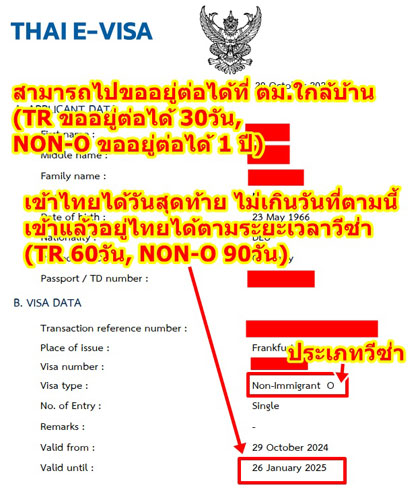
Valid from : หมายถึง วีซ่าออกให้เมื่อไหร่
- เจ้าหน้าที่ตม.จะเขียนวันที่ทับลงในตราประทับเข้าไทยว่าอยู่ได้ถึงเมื่อไหร่
Valid until : หมายถึง ใช้วีซ่านี้เข้าไทยวันสุดท้ายถึงวันที่เท่าไหร่
- เช่น Valid until 26 Jan 2025
- แปลว่า ถ้าเข้าไทย 26 มกราคม ก็บวกไปอีกตามจำนวนวันของวีซ่าที่ขอ
- เช่น วีซ่าท่องเที่ยว 60 วัน วีซ่า Non-O 90 วัน
How to apply for a Thai visa online before entering Thailand
Applying for a Thai visa means applying before entering Thailand, usually through the online system.
Once you are already in Thailand, there is no online application system. You can only apply for a visa change or an extension of stay at the immigration office. See the details in the sections below.
Things you should know before applying for a Thai visa
⬩➤ 1. You can also enter Thailand with a visa exemption. ▼
- You can enter Thailand with a 60-day visa exemption, and extend your stay for another 30 days.
- Why foreigners wanting a long stay in Thailand should get a tourist visa even with visa-free entry.
- Because visa-free entry has limitations on the total number of days per year if you wish to stay longer than 90 days.
⬩➤ 2. To apply for a visa before entering Thailand, you must apply online. ▼
- You cannot apply for a visa online after you have already entered Thailand.
- If you are already in Thailand, you must go to the Provincial Immigration Office to apply for an extension or to change your visa type.
- This means applying online, uploading your documents digitally.
- In most countries, payment can also be made online, but some countries may have certain restrictions (depending on local requirements).
- Once approved, the visa will be sent to your email as a PDF file, which you can show to Immigration when entering Thailand (no need to print).
⬩➤ 3. If you apply from within Thailand, it is not a visa application. It is an “extension of stay” or a “change of visa type.” ▼
- Extension of stay is the process of extending your stay in Thailand beyond the original visa duration.
- Change Visa type means changing your current visa category or immigration status inside Thailand.
- Both the extension of stay and change visa type must be done in person at the local Immigration Office in the province where you reside. Online applications are not available.
⬩➤ 4. Initial stay, Extension period, Where to extend, Required documents ▼
Tourist Visa (TR Visa)
- Initial stay in Thailand: 60 days
- Extension of Stay:
- You can extend your stay for 30 days.
- Contact the Provincial Immigration Office — online applications are not available.
- Required documents: TDAC, TM30, visa photo and a 1,900 THB fee.
Non-Immigrant O Visa (Marriage / Retirement)
- Initial stay in Thailand: 90 days
- Extension of Stay:
- You can extend your stay for 1 year (renewable annually without leaving Thailand).
- Contact the Provincial Immigration Office — online applications are not available.
- Required documents: depend on the visa type, such as Marriage Visa, Retirement Visa, TDAC, TM30, visa photo and a 1,900 THB fee.
Steps and required documents
⬩➤ 1. Initial Check ▼
Go to the official Thai e-Visa website:
- www.thaievisa.go.th This is the official website and can be used by applicants from all countries.
Check if you need a visa
- It depends on your passport country and how many days you plan to stay in Thailand.
- Click Check, and the system will show whether your passport requires a visa or not
- Go to Frequently Asked Questions
- Select your passport country
- Select the number of days you intend to stay in Thailand
⬩➤ 2. Basic Required Documents ▼
Photograph taken within the last six months
- A visa photo can be taken by yourself, but the whole face must be well-lit with no shadows.
- If your uploaded photo is accepted, it will be valid. If rejected, you may need to retake or crop it to the correct size.
Document indicating current location
Proof that you legally reside in the country where you are applying.
For example, if you hold a U.S. passport but live in Germany, you must provide evidence of your legal long-term residence in Germany, since the Thai Embassy in Germany will handle your application.
Financial evidence: The required amount depends on the visa type:
- Tourist Visa: 30,000 THB
- Non-O Family Visa: 400,000 THB
- Non-O Retirement Visa: 800,000 THB
Personal details of a family in Thailand
- For a Tourist Visa: if you have no inviter, provide your hotel booking instead.
- For a Visit Visa (boyfriend/girlfriend/friend/family) : submit an invitation letter to stay at a Thai relative’s home, along with their Thai ID card.
- Download Invitation Letter Form — Invite a Foreigner to Stay at Your Home in Thailand
Proof of relationship to a family in Thailand
- For a Dependent Child Visa: submit the child’s birth certificate.
- For a Marriage Visa: submit the Thai marriage certificate.
- Document requirements may vary by country. Always check the website of the Thai Embassy in the country where you apply.
- Even if you upload all the required documents, the embassy may still request additional documents.
- If you are unsure what is missing, you can contact the Thai Embassy directly via their website (“Contact Us” section) or through their official Facebook page.
⬩➤ 3. Once you decide to apply for a Thai visa before entering Thailand ▼
- Create a new account (Create an account) and verify your email.
- Select Apply Visa.
- Fill in the online application form.
- Upload supporting documents.
- Pay the visa fee online.
- Wait approximately 2–3 weeks for the visa to be processed.
- You will receive the visa confirmation by email (e-Visa confirmation document).
⬩➤ Guide to Understanding a Thai Visa ▼
Valid from: This indicates the date the visa was issued
- The immigration officer will write the permitted stay-until date over the entry stamp
Valid until: This indicates the last date you can use this visa to enter Thailand.
- If it says Valid until 26 Jan 2025,
- you can enter Thailand on 26 January.
- Then, the duration of stay allowed (60 days for a Tourist Visa, 90 days for a Non-O Visa) will be calculated from the entry date.
Videos: How to apply for a Thai visa online (English Audio)
➤ English Transcript ▼
0:00 How to apply for a Thai visa online without visiting the embassy. First, take a look at this screen. The website is thaiivisa.go.th. Follow the link shown here, and you can check the details on gonoguide.com/reopen
0:16 Refers to the online application process. Not all countries allow this. To check if your country is eligible, you need to register for an account and log in to verify.
0:28 Here is an example: if a country supports online applications, the embassy requires you to apply online exclusively, with no need to visit in person. However, if online application isn’t available, you must still contact the Thai embassy in that country directly.
0:43 As mentioned earlier, you start by creating an account. Click the ‘Create Account’ button, then proceed to this page.
0:53 Simply enter your first name, last name, country, phone number, email, and a password. The password must include English letters (both uppercase and lowercase) and numbers.
1:09 So, once you finish here, this is the Captcha code. Enter the code as shown, or press the round button to refresh the characters if the text is unclear.
1:19 Next, click ‘Create Account’. Then, proceed to log in here by clicking ‘Sign In’. This is the email address we just created.
1:28 Enter the password we just set. Then, input the Captcha code here and click ‘Sign In’. Once logged in, select ‘Apply for New Visa’.
1:39 Look at this blue section. This screen indicates whether online applications are available for the country we are applying to. It’s strange they didn’t allow us to check this from the start.
1:54 That way, we avoid unnecessary registration since not all countries support it; we must check first. Now, what should we select?
2:00 This refers to Albania. It means you’re either a citizen or hold citizenship of a specific country, such as Albania, as shown here.
2:14 If you can’t proceed online, it means you must apply through the embassy instead. This section is highlighted in red.
2:24 And this crossed-out value here is circled in red, meaning you can’t use it. Let’s look at an example that works, like Austria.
2:30 Austria requires an Austrian passport or citizenship. Unfortunately, you still can’t apply online for Austria, but this case is acceptable.
2:45 A Belgium passport and residency in Belgium mean you’re a Belgian citizen. In this case, the embassy name appears, confirming validity. Another example: an American passport.
3:03 If you are an American citizen, look here. It’s notable because there are many embassies. You must select a specific one, not just any; choose the embassy closest to your address.
3:16 They have divided the areas into regions. Some countries have several embassies, but most have just one. Okay, please verify this. If verification shows you can apply online, go ahead. Next.
3:29 Here, select your passport type. ‘Ordinary’ refers to a standard passport. Regarding the purpose of your visit to Thailand, there are various options. If you are traveling for tourism, select ‘Tourism’ for this option.
3:48 For business activities. However, if you are coming to marry a Thai national, or if you are a child or parent of a Thai national, you may stay for a longer period. This allows for extended stays or multiple entries over time.
4:06 For visitors, specifically non-immigrant visa applicants who are family members residing in Thailand for more than 60 days, this falls under the Non-Immigrant Visa category. These are distinct from other visas; there are specific sub-categories to consider.
4:22 Right above. Wait, no. The immigration visa—Type O is the Non-O visa. It’s for those married to Thai nationals, or parents with children who have birth certificates.
4:40 If your child’s name appears on the document, you can apply for a Non-O visa. Otherwise, regular tourists apply for a tourist visa, valid for up to 60 days and requiring minimal documentation.
4:54 You can renew it at any provincial Immigration Office or its branches, extending your stay by an additional 30 days for a total of 90 days (60 initial + 30 extension). As noted, the Non-O visa is available only to specific categories of people.
5:09 Not everyone qualifies; this does not apply to general tourists. You may stay for 90 days and renew for an additional year, referring to family or spousal visas. Other visa types require separate verification.
5:22 Okay, next is the entry type. A Single-entry visa allows one entry; once you leave Thailand, the visa becomes invalid. A Multiple-entry visa permits an unlimited number of entries and exits from Thailand.
5:39 So what’s the difference? A multiple-entry visa costs about 2.5 times more than a single-entry one. Some countries also require stronger proof of funds for multiple-entry visas, though most nations have similar documentation requirements.
5:55 It’s more expensive in terms of visa fees. Additionally, the validity period may be longer. For instance, a tourist visa might allow a stay of up to 60 days.
6:07 You can extend it for another 30 days, correct? The total stay would then be exactly three months. Once extended, the limit is reached. However, a multiple-entry visa might allow six months, permitting multiple entries and exits within that period.
6:21 There is no restriction on the number of entries during the validity period, but each stay must not exceed the permitted duration. Similarly, the non-immigrant O visa allows 90 days per entry. With a one-year visa, you can stay for up to 90 days each time you enter.
6:34 If you leave and return, you can stay another 90 days within the one-year visa validity. However, as noted earlier, the visa fee is higher.
6:42 So consider how often you visit. If it’s not frequent, just get a single visa as mentioned. Here, Op has selected the single option.
6:50 Next, click the button. Don’t worry if you’re confused by my earlier explanation. Simply remember: frequent visitors keep returning—entering Thailand and then departing.
7:01 Choose a multiple-entry visa if you return often. But if you visit only once a year or less, with long intervals between trips, a single-entry visa may be suitable. On the following page, complete your details and upload a photo by clicking the blue ‘Browse’ button.
7:25 You can take the photo yourself, provided it’s against a plain white background. The system will automatically check if the photo meets requirements.
7:38 The background must be plain white, as shown in this example. You may take the photo yourself. After capturing it, upload it here, ensuring the background is entirely flat and white.
7:45 Uh, the background must be unobstructed—no shadows or similar issues. If it fails, the system will notify you. Once we’ve taken the photo, the system indicates it will auto-fill the data from…
8:00 Next, click the ‘Add to Application’ button. This allows the system to automatically populate certain fields using data from your Plaspot profile.
8:11 However, you may need to verify the information, as the Plaspot photo you captured might be unclear, potentially leading to errors. So, please double-check…
8:23 Let’s review this section briefly. It includes your full name (first and last), followed by gender options: Male or Female. Below that…
8:34 This asks if you have ever changed your name, and also requests your name in the local language. If your name is already in English, you do not need to fill this in. However, you must complete any fields marked with an asterisk (*).
8:46 Here is the new field in red. Then, phone number. Please select the country first to determine the country code for the phone number. And this is the email address, which is very important and must be accurate.
9:00 This document will be sent as a PDF file to this email address, so please ensure it is correct. There are no longer visa stickers on passports; you no longer need to submit your passport to the embassy.
9:16 The process involves sending an email, printing the received document, which serves as your visa. No physical sticker is attached anymore. Therefore, once approved, the visa will be sent to this email address. Next, please state your country and nationality.
9:28 Next, do you hold citizenship of any other country? Yes or No. Your country of birth should match exactly what is in your passport. Similarly, your place of birth and city of birth must also correspond precisely to your passport. Finally, please provide your date of birth.
9:42 Regarding marital status: ‘Single’ means unmarried. ‘Married’ means married. Other options include ‘Divorced’, which means divorced. These are the standard categories.
9:56 Then below is the passport number, the place of issuance as shown on the passport, the issue date, expiration date, and the full address.
10:11 The city name will be filled in here, followed by the country. Are you a citizen? Or perhaps this refers to your permanent address? Is that correct at present, since this address is…
10:24 If a country has multiple embassies, this section must correspond to the specific embassy branch. For instance, the United States has four, so they verify whether this is the address of the embassy where the visa application was submitted.
10:37 In such cases, but if a country has only one embassy, there’s no issue. Next, this section covers occupation. No complications—simply choose from the available options. What are the choices?
10:49 Options include business owner, employee, civil servant, student, or unemployed. This category has little bearing on the outcome.
10:58 Enter the correct information. If you work or own a business, provide your name and organization name. For income, simply enter your annual amount.
11:11 Okay, click. If you click, the yellow fields indicate optional information that can be filled in later. If everything is correct, proceed by clicking next. The following page is for travel details, beginning with your entry date into Thailand—the arrival date, not your departure date from the origin.
11:28 Specify your arrival date in Thailand and your departure date. Once entered, the system will automatically calculate the duration of your stay. This refers to entering through an International Airport, meaning by air.
11:43 Alternatively, you may enter by sea or land. When entering by air, select the ‘Schedule’ and ‘Commercial’ options, which refer to standard commercial flights. Then, enter the flight number here.
11:59 To clarify, they require you to create a flight reservation when applying for the visa. However, this does not need to be a real ticket—do not purchase an actual ticket before applying. Simply provide a reservation confirmation.
12:19 Look at go-no-guide.com/visa; there are videos there, or search the go no guide channel for ‘how to book flights and apply for visas’, and you’ll find it.
12:31 Just need the booking confirmation. On that document, show the flight details, specifically the last flight before entering Thailand. Enter only that last flight here, and the system will prompt you to upload documents on the next page.
12:45 Next, have you ever visited Thailand? Have you ever applied for a Thai visa? Are you coming as a teacher? Please answer these. Then, where in Thailand will you stay? You need to select whether you’re staying at a hotel or…
13:01 If staying at a Thai person’s home, select ‘Private Property’. If staying at a hotel, select ‘Hotel’ (or ‘Hostel’), and provide the hotel’s name or booking confirmation. If invited by a Thai national, enter the host’s name and address.
13:27 That’s the inviter, along with their address and phone number. ‘Additional Place of Stay in Thailand’ refers to any other locations you’ll visit, correct? Just answer that. Now, once…
13:42 Once you’ve filled everything out, proceed. Click Next here. Now that it’s complete, move forward. Click Next here, the final page before uploading documents.
13:53 After uploading all documents, pay the visa fee immediately. Let’s check the uploaded files. First, this one is done—yes, the first page is uploaded.
14:07 The image has been uploaded too. To see how it looks, click the blue button below. This section requires a link; here it is.
14:20 First, enter your name and other details, then upload them here. Once the Declaration is complete, this section covers financial evidence, such as bank statements and income proofs.
14:34 Bank account details. For tourist visas, the requirements are lenient—the financial threshold is only about 20,000 baht for a single-entry visa. However, for a multiple-entry visa, you may need to refer to the official website.
14:49 According to that country’s Thai embassy, do they have stricter criteria? For example, some countries require more funds than before when applying for a multi-entry tourist visa.
15:02 However, for a single-entry tourist visa, twenty thousand THB is usually sufficient. You only need to provide a one-month bank statement—specifically the official document from your bank, not just a screenshot.
15:14 Please save the bank statement as a PDF. However, for a non-immigrant visa, the usual requirement is proof of funds totaling 400,000 THB maintained continuously for two months. Alternatively, you may need to check the specific document requirements listed on the embassy’s website.
15:29 You may consolidate funds from multiple accounts, but since only one file can be uploaded, you must combine them into a single document before uploading. Therefore, whether applying for a multi-entry tourist visa or a non-immigrant visa, it is best to review the required documents on the embassy’s website first.
15:42 This section requires documents from the Thai sponsor. Specifically, you need to provide a photocopy of either the national ID card or passport of the Thai individual issuing the invitation. The sponsor must photocopy the document, sign it, certify it as a true copy, and then scan or photograph it for upload.
16:02 The next item is also a document from the Thai sponsor: an invitation letter. Up has a video tutorial on writing an invitation letter for foreigners—see it at gonguide.com/visa along with a copy of the house registration.
16:18 Okay, after finishing that, Up adds: To clarify, this item can be either a Thai ID card or a passport, or you may submit both—it’s up to the Thai sponsor.
16:29 Next, below are a copy of the house registration and the invitation letter from the sponsor. Item seven applies only to Non-O visa applicants. Initially, you select something…
16:44 You selected Non-O, didn’t you? There’s no tourist visa option here—this applies only to Non-O applicants. You initially chose Non-O, right? No tourist visa available.
16:47 This is an official document demonstrating the relationship between the foreigner and the sponsor. A Non-O visa is only issued when the applicant is a family member—such as a spouse, child, or parent—of a Thai citizen.
17:01 Therefore, you must upload either a marriage certificate or a birth certificate, depending on the situation. For spouses, submit the marriage certificate; for parents and children, submit the birth certificate, which must be in Thai.
17:15 I believe most people already have these documents. Regarding this section, if…
17:22 Based on the heading, if the applicant is not a native of that country but moved there later to work or reside…
17:32 You’ll need a resident permit, correct? If you already have one as a foreigner, upload it. However, if you’re a citizen, what document should you provide instead, since citizens don’t have resident permits?
17:42 So, you can upload other documents, such as a driver’s license or similar. If you have nothing else, simply re-upload your passport, as there is a specific icon requiring this action.
17:57 In short, you can upload any document. If you have a resident permit, submit that. If not, since you are already a citizen of that country, you may upload a driver’s license or similar document for this item.
18:09 Item 9 calls for an additional letter. As mentioned earlier, we already covered the invitation letter; now there is one more letter specifically for Non-O visa holders, just as before. No tourist visa document is needed here.
18:20 This is a letter in which the spouse or the inviting party confirms that they are still legally married.
18:32 You are living together, and it is understood that you will travel or take some action, though it doesn’t require many steps. For instance, this applies to relationships like husband and wife, or parents and children.
18:42 Children, correct? So, I could be the wife, or the husband of this person. Are we talking about husband and wife, or parents and children? Essentially, I am the spouse, or the parent, or the child of this person.
18:49 He will come to visit, and I have noted the date. That’s all—just the name, nothing more. Writing in Thai is fine since the audience is Thai.
19:02 This refers to the contact information at the embassy abroad. If you have two letters—an invitation letter and others—and you’re unsure how to proceed, contact the appropriate office. Item ten requires taking a photo, uh…
19:16 For your travel history, please take a photo of the first page, as well as any other pages containing stamps or visa stickers from the last twelve months.
19:32 Photograph everything you have, combine the images, and upload them. This covers your travel history. Finally, submit documents proving that your visa application was submitted correctly.
19:50 Ensure it matches the actual embassy where they are based. In this case, Op typically accepts any supporting document, such as an employment certificate or other identity verification papers. Simply upload them.
20:07 Don’t worry; if anything is incorrect, the embassy will contact you via email to request corrections, and you can submit them later.
20:17 Any ID document with their name on it is fine. Ultimately, just upload a selfie holding your passport; you may need someone else to take the photo.
20:34 Stand holding the first page of your passport, then take a photo of yourself holding the open first page.
20:44 Take a selfie facing the camera while holding the open first page of your passport, ensuring your photo is visible on the page.
20:47 Take the photo there, then upload it. If everything is complete, press the button here. If not, a warning will appear prompting you to upload the missing items.
20:57 Once you complete this step, you must select the payment option. Let’s return to the e-visa dashboard. Upon logging in, you’ll see this page. There is a button there—the one corresponding to the form we just completed.
21:15 This section is at the bottom. Right here, once you check the box beside the relevant entry, a payment icon will appear. Please note that this example does not show all items being submitted, as expected.
21:28 A payment icon will appear here. After submitting, click the payment icon and proceed with payment just like any online purchase. The entire process typically takes around 15 days, at most three weeks.
21:44 If no additional documents are required, the visa will be sent via email. If issued, it will appear as follows. This is the document we need to print.
21:56 As previously stated, there will no longer be a sticker affixed to the passport. Instead, we must print this document. It contains information such as the visa type, which indicates…
22:05 A tourist TR refers to travel visas or the non-immigrant type O visa for long-term stays, available as single or multiple entries, with work strictly prohibited.
22:17 The visa issuance date is on what day? This date marks the final day you may enter, not the final day you can remain in Thailand, as illustrated in this example.
22:29 This is a Type O visa. It does not mean you must rush immediately. While you can stay in Thailand, you must depart by March 28th. Actually, the final day to enter Thailand is March 28th. For instance, if you arrive on March 28th…
22:44 You are allowed to stay for the full duration. For example, with a tourist visa, if the deadline is March 28th, arriving on that very day still grants you the full stay. This illustrates how the tourist visa works.
22:48 You receive an initial 60-day stay, which can be extended by another 60 days, and further extended by 30 days, totaling 90 days. For a Non-O visa, the extension also brings the total to 90 days. Therefore, this date marks the final opportunity to enter, not the final day you can remain in Thailand.
23:00 Okay, that’s the end of this part. If you have any questions after listening,
23:03 feel free to comment below. Today, thank you for listening.
All videos are in Thai. English audio is available on YouTube.
👉 YouTube Settings → Audio track → English
🔗 Guide to Applying for a Non-O Retirement e-Visa (Online Application Before Entering Thailand)
🔗 Guide to Applying for a Non-O Spouse Visa Online Before Entering Thailand